


Over the past year as a SaaS developer at Fenergo, I've been focused on the challenge of hosting a third-party SDK inside our AWS ecosystem. My goal was to ensure the service could run in a way that scales reliably, integrates cleanly with our existing infrastructure.
To achieve this, I used Pulumi to streamline Infrastructure as Code, which made it easier to model, manage, and iterate on cloud resources as the project evolved. Wherever possible, I leveraged existing infrastructure components - such as our VPC, subnets, and security groups - instead of duplicating effort. For new requirements, I identified and provisioned the most appropriate AWS services that fit our needs, balancing performance, cost efficiency, and maintainability.
A key part of the solution was building and automating CI/CD pipelines, which allowed us to provision infrastructure, deploy updates, and run validations in a consistent and repeatable way. This gave the team confidence to roll out changes quickly while keeping downtime and risk to a minimum.
In this blog, I'll walk through the approach we took and the technical considerations behind it.
Architecture
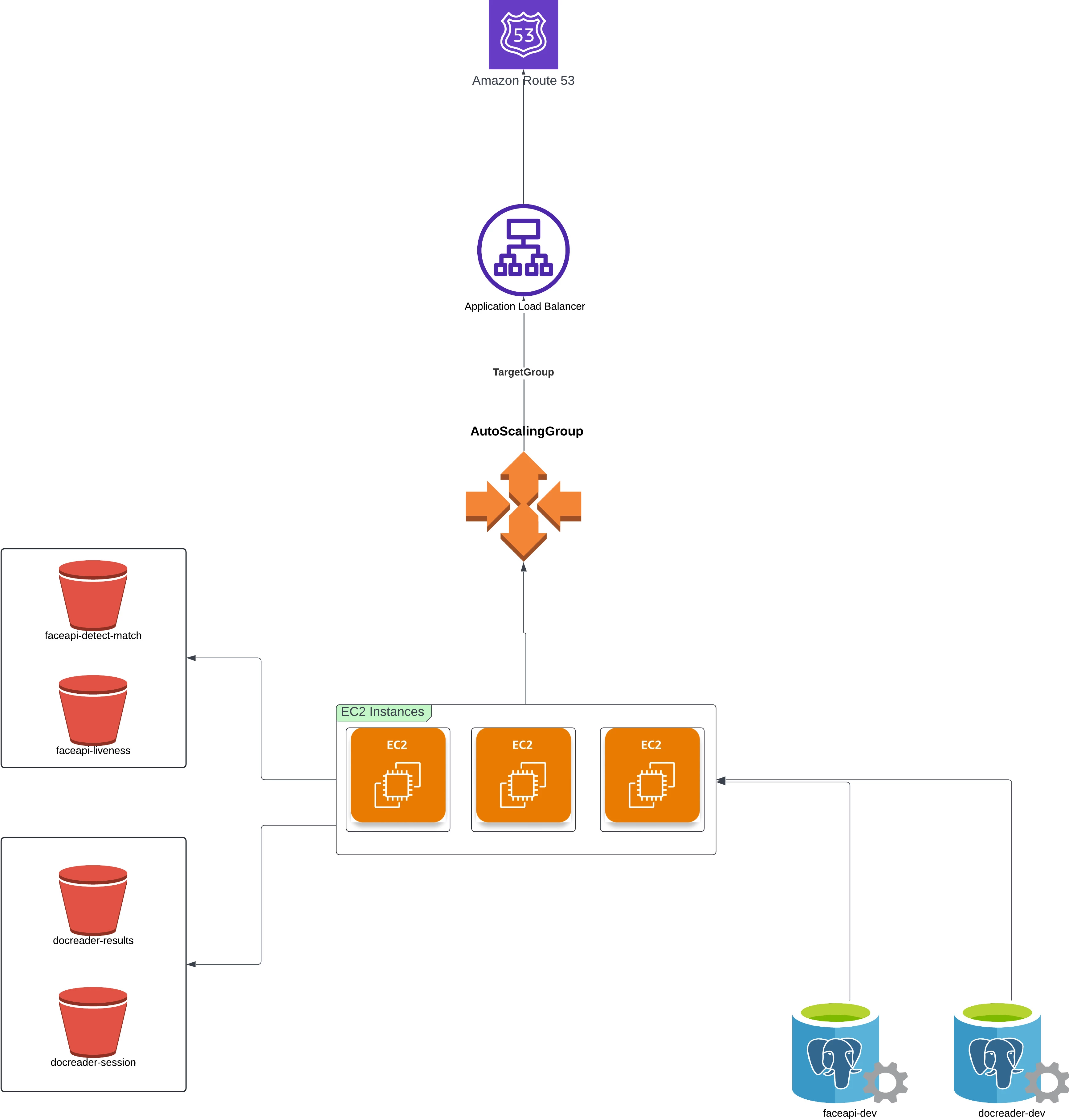
Integrating the SDK wasn't just about plugging in a service - it required designing an infrastructure that could grow with demand, stay resilient, and remain cost-efficient. Instead of relying on a single server, we built a system that scales automatically, and ensures high availability.
Here's how the architecture looks under the hood:
- EC2: The SDK is packaged into Docker containers, running on Amazon EC2.
- Auto Scaling Group: EC2 instances scale up or down automatically depending on traffic, so we only use the resources we need.
- Load Balancer: An Application Load Balancer distributes requests evenly, keeping the service highly available.
- RDS Instances: Amazon RDS hosts our PostgreSQL database, giving us a reliable and fully managed environment for storing sensitive verification data securely.
- S3 Buckets: S3 buckets are used to collect the request, response, document images, metadata, session keys and challenges of the RFID chip processing.
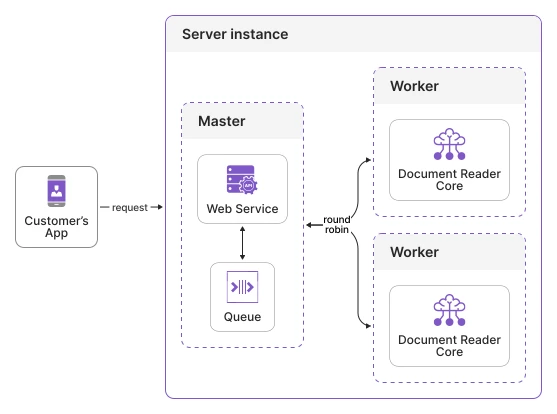
We containerized the SDK using Docker, which makes it easy to run both the DocumentReaderAPI and FaceAPI services consistently across environments. Each EC2 instance launched by our Auto Scaling Group automatically pulls these images and starts them with a startup script defined in the launch template. EC2 instances are configured with mounted volumes for licenses and configuration files, ensuring they can be updated and managed seamlessly.
To handle routing, each instance runs nginx as a reverse proxy. It forwards incoming requests to the appropriate container - document verification requests go to the DocReader container, while face comparison requests are directed to the FaceAPI container. This keeps traffic well organized and ensures optimal use of resources.
For performance, we run multiple workers per service, depending on available CPU and memory. On a typical t3.xlarge instance (4 vCPUs, 16 GB RAM), we run two workers for each service, aligning with the SDK's hardware recommendations (minimum: 1 CPU and 3.5 GB RAM per worker). Nginx distributes requests across these workers, enabling parallel processing and reducing response times.
This containerized approach makes scaling straightforward: as demand increases, new EC2 instances are spun up automatically, each running the same three-component setup (nginx + DocReader + FaceAPI).
We also configured horizontal scaling using AWS Auto Scaling. This ensures the system can intelligently adjust the number of EC2 instances based on demand. We defined Target Tracking Scaling Policies in AWS Auto Scaling. These policies adjust the number of EC2 instances based on resource utilization. For example, we set a scaling policy that maintains average CPU utilization at around 20% across the group. This ensures that the system reacts quickly to spikes in demand by launching new EC2 instances, while also scaling back down during quiet periods to keep costs low.
By combining intra-instance scaling (workers) with inter-instance scaling (Auto Scaling Group policies), we achieved a highly responsive and cost-efficient infrastructure.
Finally, our Application Load Balancer (ALB) distributes incoming traffic across EC2 instances, handling both HTTP (80) and HTTPS (443) with automatic redirects to HTTPS. Health checks ensure only healthy instances receive traffic. As new EC2 instances are launched or terminated, they're registered and deregistered automatically, keeping the system consistently available.
Deployment
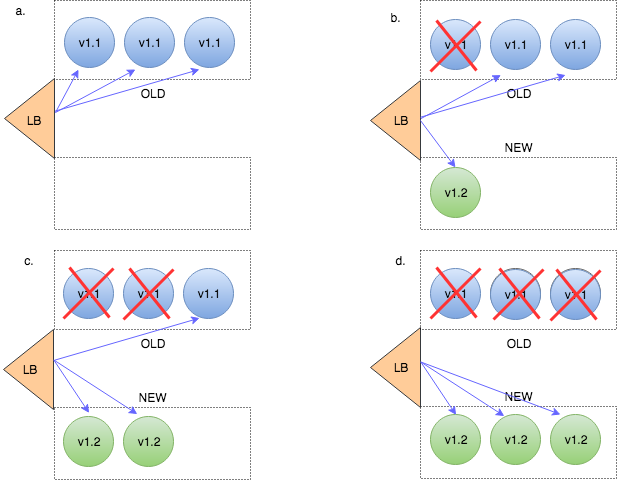
For deployment, we rely on AWS Auto Scaling's instance refresh feature. Instead of replacing all servers at once, we use a rolling strategy that updates instances gradually while keeping the system fully available. Each new instance goes through a warm-up period before taking traffic, ensuring it's healthy and ready to serve users. We also set checkpoints at 50%, 75%, and 100% of the rollout, giving us the chance to validate stability at each stage. This entire process is executed through our automated CI/CD pipeline, which orchestrates the rollout end-to-end. That way, deployments are safe, controlled, and zero-downtime, even during peak usage.
Closing Thoughts
Provisioning the Identity Verification SDK with AWS has been a rewarding challenge. It's a great example of how modern SaaS companies can leverage infrastructure as code, cloud scalability, and advanced verification tools to deliver secure, seamless, and impactful client experiences.
At Fenergo, we're excited to keep building on this foundation, knowing that each improvement directly translates into faster onboarding, stronger security, and a smoother client experience. The intersection of fintech and identity verification is evolving rapidly - and we're proud to be part of that evolution.
Thanks for reading!
Alexis