
Financial institutions increasingly operate in multi-jurisdictional and multi-divisional environments where client and product data is shared widely across the enterprise—but with important exceptions. A common pattern is:
- Two or more divisions (e.g. Markets / Corporate / Commercial) that generally want to share client and product data.
- A “Private” or restricted division (e.g. Private side of an investment bank, Private Banking, M&A) that sometimes needs to segregate client and product data, either temporarily or permanently, to comply with legal, regulatory, or internal conduct requirements.
Fen-X supports these needs through flexible security configuration, access layers and information barriers, while still enabling a single client view and re-use of data across products, business lines and jurisdictions.
This article summarises three common configuration models:
- Dual Entities – Entity-Level Access with “Controlled” Duplication.
- Single Entity – Entity-Level Access Control.
- Single Entity – Product-Level Access Control.
We’ll walk through when each model fits, how they work at a high level, and how they can be combined.
Note: This article is for information purposes only. Final design choices must be aligned with your own Legal, Compliance and Information Security policies.
Key Fen-X Concepts for Information Barriers
Before looking at the models, it’s helpful to anchor on a few Fen-X concepts that are typically involved in security design:
- Client / Entity – The core record capturing the client, counterparty or obligor profile.
- Product domain – Product-level data such as facilities, accounts, deals and arrangements.
- Data Sections / Data Groups – Logical groupings of fields within an entity or product (e.g. “Purpose of Relationship”, “Deal Details”, “MNPI Data”).
- Teams – Logical user groups (e.g. “Global Public”, “Private Banking”, “Centralised KYC Team”).
- Access Layers / Security Configuration – Access rules applied to entities, data sections and product data to control who can search, view, edit and report on specific records and fields.
Configuration is typically managed through the Security Configuration area of the platform and related admin pages (for example Teams, Access Layers and Landing Pages). Detailed “how-to” steps and configuration screens are available in the Fenergo Docs Portal under the User Guides and Admin sections (search for topics such as Security Configuration, Teams and Access Layers, and Product Domain Security).
Model 1: Dual Entities – Entity-Level Access with “Controlled” Duplication
When to use this model
This model is used when a division (for example, a Private side or M&A advisory unit) needs a strict information barrier such that users on the public side should not even see that a “private” relationship exists.
- Very strict legal or internal policy on information segregation.
- High sensitivity to inference risk (for example, where merely knowing a client is being advised on a transaction is material information).
- Relatively low volume of “private” relationships, so duplication can be operationally managed.
How it works
- For each client, there may be two entities: a public entity (visible to public-side and shared teams) and a private entity (only visible to teams with access to the private access layer).
- When a client needs to be worked on privately, a private entity (and related parties) is created on the private side of the barrier.
- If the client already exists publicly, that public entity is not reused; instead, a “controlled duplicate” is created.
- A reference (for example, an identifier linking public and private entities) is typically stored on the private side to assist analysis and reporting by users who can see both.
Example team structure (illustrative):
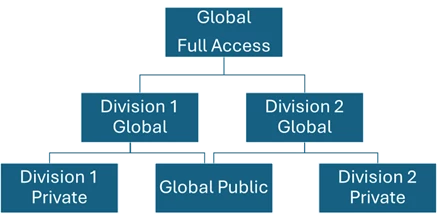
- Global Public – can access the Global Public entities only.
- Division A Private – can access Division A Private entities only.
- Division B Private – can access Division B Private entities only.
- Division A Global – can access Global Public and Division A Private entities.
- Division B Global – can access Global Public and Division B Private entities.
- Global Full Access / Centralised KYC Team – can access all entities (public and private).
Note: Access layers are not hierarchical in the Fen-X; this is just a conceptual way of describing teams with combinations of access layers.
Pros
- Strongest information barrier: public-only users are completely unaware that a private entity exists.
- No inference leakage: not even the existence of a private relationship can be inferred from public data.
- Simple security model: entity-level access rules are relatively straightforward to configure and reason about.
Cons
- Data duplication: there are multiple client records and hierarchies to maintain.
- Operational overhead, including potential for dual outreach to the same client if not carefully controlled.
- Need for rules and training on which entity to use in which context.
- Reporting complexity, as reports need to consider public and private together where appropriate.
This model has been used successfully by clients where the number of private-side clients is limited, or where the prohibition on even inferring private activity (such as for certain M&A deals) outweighs the cost of duplication.
Model 2: Single Entity – Entity-Level Access Control
When to use this model
This model is aligned with the classic CLM design where the client record is shared across divisions and only specific, sensitive data fields (often within defined sections or data groups) need to be visible to the Private side.
- Strong desire to maintain a single golden client record (no duplication).
- Private data is mostly contained in specific parts of the entity rather than at the product or deal level.
- Legal and compliance teams are comfortable with the public side knowing the client exists, as long as confidential fields are masked.
How it works
- There is one client entity.
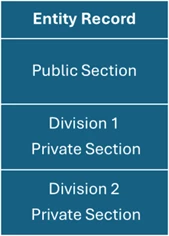
- Entity-level data is broken into sections or data groups, such as core client profile, relationship or mandate details, and private or MNPI-related data sections.
- Access layers are configured so that public teams can see general KYC and non-sensitive sections.
- Private teams can see both general sections and one or more restricted sections (for example “Private Deal Information”).
- Searching, viewing, editing and reporting all respect these barriers, so users without access cannot see the content of restricted sections.
Pros
- Single client record, avoiding duplicates and simplifying hierarchy management.
- Re-use of data across divisions for KYC, AML and regulatory purposes.
- Straightforward configuration, focused mainly on assigning sections and data groups to access layers and teams.
Cons
- Inference risk: public users can see that the client exists in the system, even if all private fields are masked.
- Does not by itself segregate product-level data; it is focused on the entity-level data sections (although it can be combined with Model 3).
This model is widely used where commercial reality and operational efficiency favour a single client record, and where Legal/Compliance accept that public teams may know of the client’s existence, but not the detail of private activity.
Model 3: Single Entity – Product-Level Access Control (New)
When to use this model
This model is appropriate when you want one shared client entity and private activity is best modelled at the product or deal level, not just as fields on the entity.
- Private banking versus public-side products for the same client.
- Deal-by-deal segregation, for example certain financing or advisory transactions.
- Cases where some products must be completely hidden from all but a subset of users.
How it works
- There is one client entity for the client.
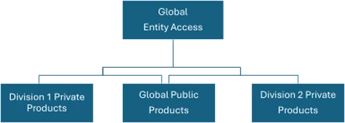
- Product-level data is configured so that certain products are only visible to teams with access to a private product access layer.
- Even for products visible to multiple teams, selected fields within the product can be restricted to specific teams.
- Combined with Model 2, entity-level private sections can also be restricted while product-level rules ensure that specific deals or product relationships are completely hidden or partially masked.
This is a newer capability in Fen-X, introduced to better handle complex public/private scenarios and private banking use cases. It is increasingly adopted by clients who want to avoid duplication while still meeting strict information barrier requirements.
Pros
- Single client entity with no need for duplicate client records.
- Fine-grained control: you can hide entire products or hide specific fields within those products.
- Works well when legal and privacy concerns are primarily about specific products or deals, not just the client being known to the organisation.
Cons
- All private activity must be represented at the product level; if some private considerations are conceptual or policy-based rather than productised, additional design may be needed.
- As with Model 2, the existence of the client entity in the system may still be used to infer that some relationship exists, even if no products are visible to public teams.
Comparing the Models
The table below provides a high-level comparison of the three models.
| Question | Model 1: Dual Entities | Model 2: Single Entity, Entity-Level | Model 3: Single Entity, Product-Level |
| Single client view? | No, separate public & private entities. | Yes. | Yes. |
| Duplicate client records? | Yes (controlled duplicates). | No. | No. |
| Best when… | Strict legal separation and low volume of private clients. | Legal allows shared awareness of client; desire for single view. | Information barrier is primarily about specific products or deals. |
In practice, many institutions use a hybrid approach. For example, Model 2 plus Model 3 provides a single entity with both entity-level and product-level restrictions, while Model 1 is reserved for exceptional, highly sensitive scenarios such as certain M&A transactions.
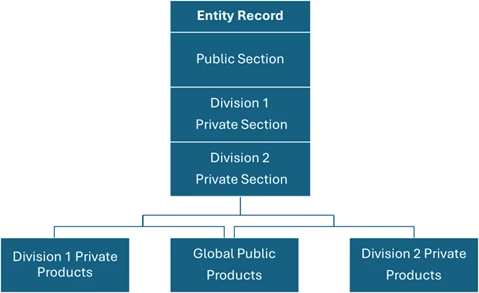
Model 2 and 3 Combined.
Multi-Jurisdiction and Multi-Division Considerations
For global institutions, information barrier design needs to coexist with multi-jurisdictional KYC, AML and regulatory requirements, local data privacy regulations (such as GDPR and other regional privacy laws), and multi-entity operating models.
- Start from policy, not tooling – clarify with Legal and Compliance what is strictly required before picking a model.
- Aim for the simplest model that meets policy – where possible, prefer single entity models (2 or 3) to minimise operational complexity, and reserve dual entities (1) for cases that truly require it.
- Use a central team to manage edge cases – for example, a Centralised KYC or Control Team with broader access to identify controlled duplicates, decide which record to use for outreach, and monitor for leakage.
- Document governance and procedures – including entity and product creation rules, outreach rules and reporting standards to avoid double-counting or misinterpretation.
Where to Find More Detail in the Fenergo Docs Portal
Within the Fenergo Docs Portal, you can find more detailed configuration guidance. While exact navigation depends on your portal version and entitlements, typical areas to look at include:
- User Guides → Administration / Security – for Security Configuration, access layers, landing pages and team management.
- Configuration Guides – for Entity Data Sections and Data Groups, and how to model which data is “private” and securable.
- Product Domain Security / Product-Level Access Control – for configuring visibility and field-level rules on products.
- Best-practice and Community articles – for case studies and how-to guides on multi-division, multi-jurisdiction CLM deployments and product updates.
If you do not see some of these topics in your portal, your Fenergo representative or Customer Success Manager can help identify the equivalent documents for your release and region.
Practical Next Steps for Your Organisation
When approaching your own information barrier design in Fen-X, the following steps can help structure the discussion and design process:
- Map your business structure – identify which divisions operate on a public side, which have a private side, and which teams need global visibility.
- Classify your data – decide which data is always public, always private, or context-dependent (for example only private when attached to specific products).
- Prototype one or two models – use a sandbox or lower environment to configure a Model 2+3 single-entity approach and a Model 1 dual-entity approach for highly sensitive scenarios, then run realistic use cases.
- Validate with stakeholders – run through scenarios with Legal, Compliance, Front Office and Operations to confirm that information barriers meet policy and operational overhead is acceptable.
- Document and train – document configuration and business rules, and train system administrators and business users on the chosen approach.
Once an approach is agreed, it is helpful to maintain a living internal design document that sets out your chosen models, their use cases, and ownership for ongoing governance and updates.