


Introduction
Hi everyone, last week we wrapped up another fantastic Client Council where I had the chance to engage with many of our clients across a variety of topics, with one consistent topic being the methods of creating and updating Entities at scale in Fenergo and which method is best suited for particular scenarios.
With that in mind, I wanted to write a small blog on how best to load Entity information into a Fenergo tenant, depending on the scenario a user might be dealing with.
There a few different ways to create and update Entities within a Fenergo tenant which are:
- Manual Entry
- Bulk Upload
- Data Migration
- ETL
- API Integrations
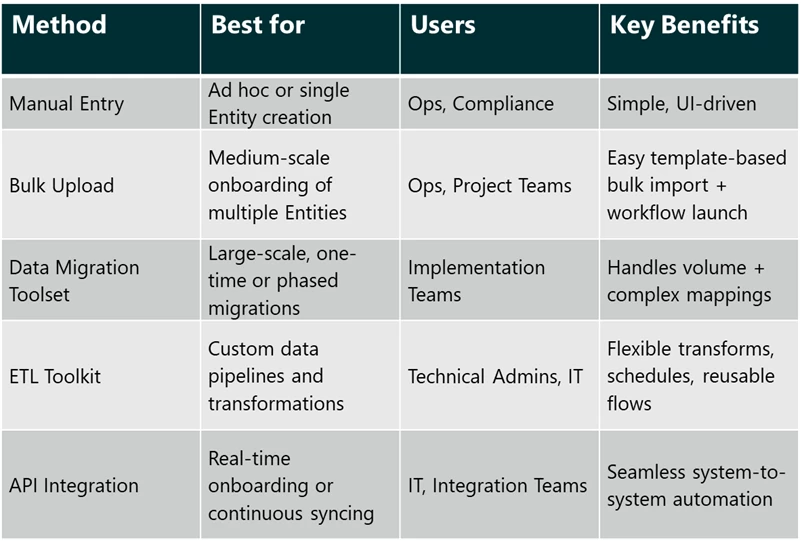
Below, I will map out each method and what scenarios it caters for with the hope of providing more insight to users as to which method to use when they are dealing with creating or updating Entities at scale.
Summary Comparison Table
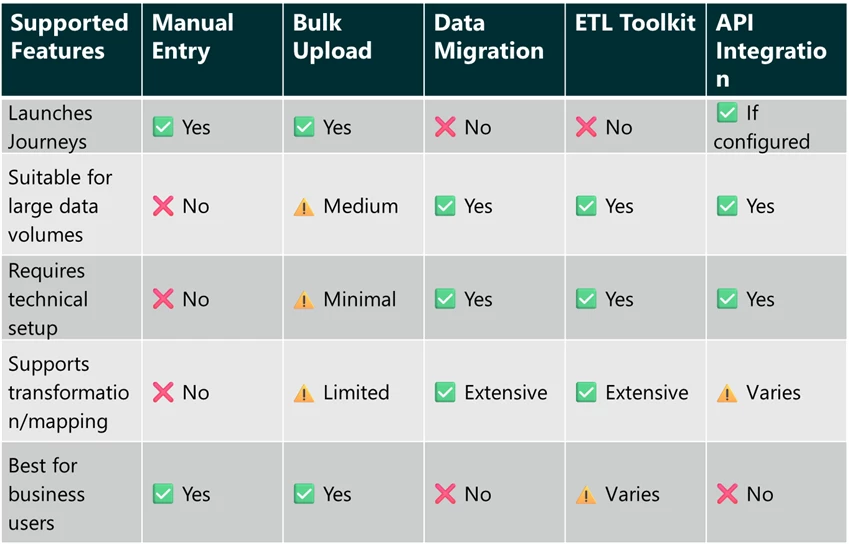
Key Differences
Detailed Method Breakdowns
In this section, I will breakdown each method that Fenergo provide for loading Entity information into the application and which scenarios are best suited for each method.
Manual Entry
Use when: This is your typical interaction in the application where the user is interacting with the New Request function for creating a new Entity or clicking on the ‘Launch’ function on the Entity Profile Page for an existing Entity in the UI.
Best For: This approach is best suited for creating Ad hoc onboarding / maintenance journeys or test purposes.
Key Capabilities:
- Step-by-step entry through the application UI
- Can launch Journeys directly after Entity creation
Limitations:
- Time-consuming for large volumes
- Manual errors possible
Bulk Upload
Use When: Bulk Upload functionality caters for scenarios where a business / operations user wants to create or update Entities in a tenant as well as create associations between Entities. Users will also be able to launch their own defined Journeys.
Best For: This approach is best for scenarios where business users need to create or update multiple Entities in the same request based on pre-defined information.
Key Capabilities:
- Pre-define a Bulk Upload template using Policy
- Upload from Excel template
- Launch Journeys as part of creation / update process
- Create / Update Entities, Create Associations & Create / Update Products
Limitations:
- Template dependent
- Best for medium-scale data loads (max 1000 Entries in a File)
Data Migration Toolset
Link to Data Migration user guides
Use When: Data Migrations You're migrating large datasets during implementation or platform replacement.
Best For: Historical record loading, client go-lives, structured IT-led projects.
Key Capabilities:
- Supports complex mappings and data transformations
- Handles bulk loading of Entities, Associations and Products
Limitations:
- Does not launch Journeys
- Requires pre-staging, technical setup and validation
ETL Toolkit
Use When: You need flexible data flows with transformation from external sources.
Best For: Ongoing data ingestion, enrichment, and batch updates.
Key Capabilities:
- Extract, transform and load data from external sources
- Reusable and schedulable data pipelines
Limitations:
- Does not launch Journeys
- Requires technical configuration
API Integration
Link to Integration flows user guide
Use When: You want automated or real-time onboarding from other systems.
Best For: System-to-system integration, scalable operations.
Key Capabilities:
- Enables live onboarding of Entities
- Can be configured to launch Journeys
- Integrates with internal/external systems
Limitations:
- Requires development resources
- Error handling and logging setup needed
Conclusion
That's it for now. Hopefully the above is clear and helps you as the user identify which best method to use when either creating or updating Entities at scale in Fenergo.
As always, if you have any questions on the above or indeed about any other functionality within Fenergo, please do not hesitate to reach out.
Thanks for reading!
Tim